Understand and Implement OAuth in MCP Servers

1. Introduction
If you’re reading this, you likely already know what the Model Context Protocol (MCP) is. And if you work with software, you know how critical authentication and authorization are for securely serving users. For the same reason, MCP servers commonly require users to authenticate themselves before permitting them access to protected resources or perform specific actions.
For example, imagine a PayPal MCP server which serves tools like list_transactions, send_money, etc. The action and the result of these tools are very specific to the user making the tool call. And, to cater to user-specific requirements, MCP servers need auth.
In this blog, I will walk you through how different authentication and authorization mechanisms work in an MCP server, focusing specifically on two primary methods:
- Header-Based: This is typically used for authenticating users using static credentials that are configured when registering the MCP server with the host.
- OAuth-Based: This follows the OAuth 2.1 flow as described in the MCP specification. It authenticates users dynamically and grants scoped authorization based on user consent and client configuration.
When we reach the OAuth section, I will walk you through creating a PayPal’s external MCP server that allows users to securely and seamlessly login to their PayPal account and use the tools to perform PayPal related actions. This server will implement the complete OAuth 2.1 authorization flow enhanced with PKCE (Proof Key for Code Exchange) and resource indicators as described in the MCP specification, creating a secure mechanism for obtaining user consent and access tokens. And of course we will build this all while adhering to modern security best practices.
2. Technology Stack
The sample code snippets provided below are in Python using the FastMCP package for building MCP servers.
Note that FastMCP doesn’t support the OAuth2.1 flow mentioned in the MCP specification at the time of writing of this blog (16-07-2025). This gives us an opportunity to learn and build it from scratch according to the specification.
3. Header-Based
 Figure 1: Header-Based Auth Flow
In this approach, user typically configures auth headers (static credentials) in the MCP server configuration during registration in the MCP host. These headers are then injected into the request made by the MCP client when the LLM selects and calls a tool. Usually it is a good idea to use header-based auth while connecting an MCP server to autonomous AI agents, where there is minimal human involvement.
Note that this approach ensures LLM doesn’t get to see the credentials while calling a tool ensuring privacy.
3.1. Characteristics
- Configured once during server registration (addition) in the MCP host.
- Sent with every request in headers (e.g.,
Authorization: Bearer <api-key>orAuthorization: Basic <base64>). - No user interaction required after initial setup.
- Authorization is typically implicit in the credentials themselves (e.g., API key grants access to a fixed set of actions).
3.2. Client Example
The user either inputs the credentials (or fetches from the environment if the host supports it) in the headers object that should be injected to every request made to the MCP server. Check the code snippet below to see a sample MCP server registration in Visual Studio Code (MCP host) with header-based auth. This would allow the server to get the credentials from the request headers and serve the client accordingly.
1
2
3
4
5
6
7
8
9
10
11
"mcp": {
  "servers": {
    "mcp-shipment-tracking-test": {
      "type": "http",
      "url": "https://0.0.0.0:8080/byoa/default_app/mcp/",
      "headers": {
        "Authorization": "Basic <credentials>"
      }
    }
  }
}
3.3. Server Example
The server implementation shows how to capture and process authentication headers sent by MCP clients. This approach uses a custom middleware to intercept incoming requests and make headers available throughout the request lifecycle. The server uses Python’s contextvars module to store headers in a request-scoped manner. Context variables are crucial here because they provide isolated storage that is:
- Thread-safe: Each request gets its own isolated copy of the headers
- Async-safe: Works correctly with async/await patterns
- Request-scoped: Headers are automatically cleaned up after each request
This ensures that headers from different concurrent requests don’t interfere with each other, which is essential in a multi-client server environment. The middleware’s implementation can be seen in the code snippet below which does the following:
- Captures the incoming request headers.
- Stores them in the context variable using
headers.set() - Processes the request by calling
call_next(request) - Ensures cleanup by resetting the context variable in the finally block.
1
2
3
4
5
6
7
8
9
10
11
12
13
14
15
16
17
18
19
20
21
22
23
24
25
26
27
28
29
30
31
32
33
34
35
36
37
38
39
40
41
42
43
44
45
46
47
48
49
50
51
52
53
54
55
56
57
58
59
60
61
62
63
64
65
66
67
68
69
70
71
72
73
import os
import contextvars
import logging
import types
from fastmcp import FastMCP
from typing import Annotated
from pydantic import Field
from starlette.middleware.base import BaseHTTPMiddleware
logging.basicConfig(level=logging.INFO)
HOST = "0.0.0.0"
PORT = 8080
BYOA_APP_NAME = os.environ.get("COSMOSAI_BYOA_APP_NAME", "default_app")
# Usage: To access headers in your code, use `custom_headers = headers.get()`
headers = contextvars.ContextVar("headers", default={})
class HeadersMiddleware(BaseHTTPMiddleware):
async def dispatch(self, request, call_next):
token = headers.set(request.headers)
try:
response = await call_next(request)
finally:
headers.reset(token)
return response
def inject_additional_endpoints(mcp_instance):
"""Use Monkey Patch to inject additional endpoint"""
# Original http_app method
original_http_app = mcp_instance.http_app
# Rewrite http_app method
def patched_http_app(self, *args, **kwargs):
app = original_http_app(*args, **kwargs)
app.add_middleware(HeadersMiddleware) # Add middleware to capture headers
return app
# Replace instance method
mcp_instance.http_app = types.MethodType(patched_http_app, mcp_instance)
mcp = FastMCP("Shipment Tracking MCP")
inject_additional_endpoints(mcp)
@mcp.tool()
def add_numbers(
a: Annotated[int, Field(description="First number to add")],
b: Annotated[int, Field(description="Second number to add")],
) -> int:
"""
Add two numbers together.
This tool takes two integers and returns their sum.
"""
custom_headers = headers.get()
auth_header = custom_headers.get("Authorization")
if auth_header:
logging.info(f"Authorization header: {auth_header}")
return a + b
if __name__ == "__main__":
# Initialize and run the server
mcp.run(
transport="http",
host=HOST,
port=PORT,
log_level="DEBUG",
path="/byoa/{0}/mcp/".format(BYOA_APP_NAME),
)
Since FastMCP doesn’t natively support middleware addition, we utilize monkey patching to inject the middleware. After that, headers can be accessed using the context variable, within any MCP tool. This implementation provides the foundation for various authentication schemes like Bearer tokens, API keys, Basic Auth, etc.
- Bearer tokens: Check for
Authorization: Bearer <token> - API keys: Validate custom header values like
X-API-Key - Basic authentication: Decode and verify
Authorization: Basic <credentials>
The server can implement appropriate validation logic based on the authentication method used, denying access to tools or returning different data based on the user’s credentials.
4. OAuth-Based
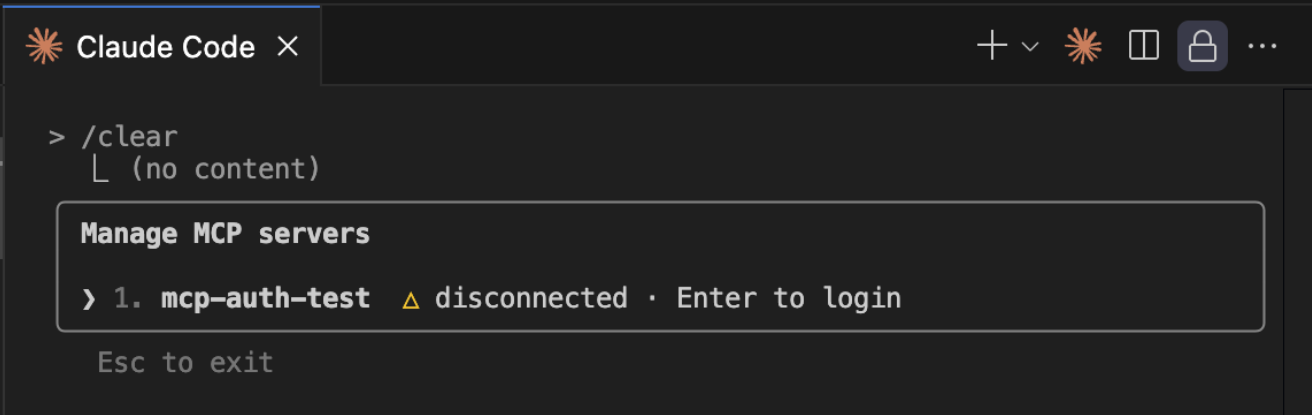 Figure 2: Listing all MCP servers in Claude Code
This approach follows the OAuth 2.1 flow as described in the MCP specification. In this approach, the user doesn’t have to configure anything other than register the MCP server in the host. Once the host starts a connection to the server, the OAuth flow is discovered and is automatically handled by the client (See Figure 2).
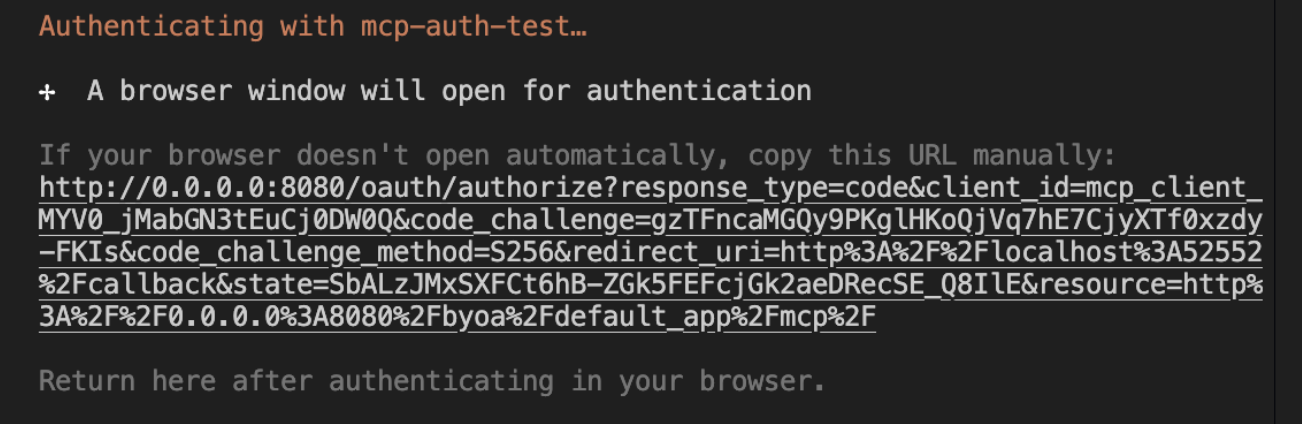 Figure 3: MCP Client initialises authentication in browser
The host authenticates the user dynamically by redirecting them to a login page and grants scoped authorization based on user consent and client configuration (See Figure 3).
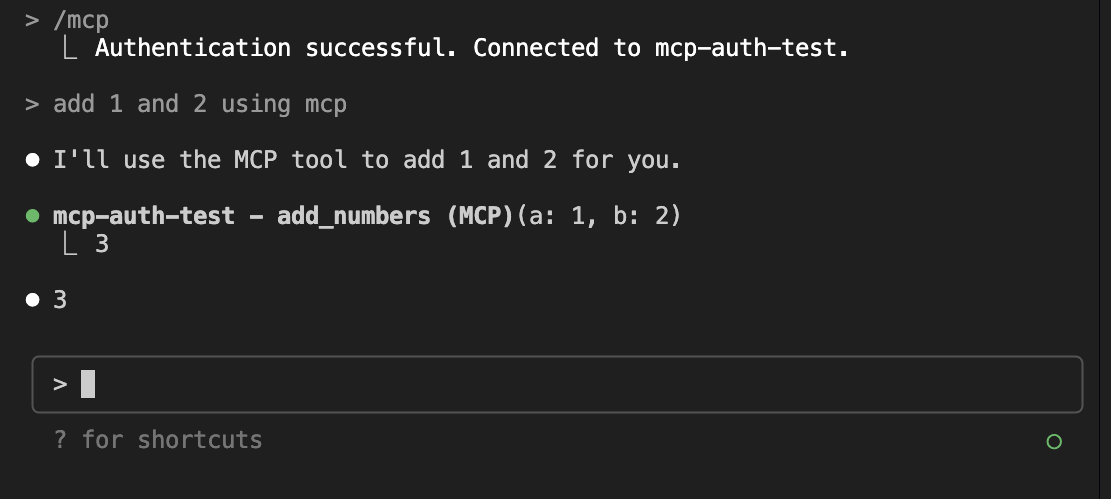 Figure 4: Tools can be accessed after auth flow is complete
Note that once the flow is complete and host receives the access token, it injects it in the headers in all subsequent requests. Typically, the MCP server uses this information to internally access protected services (See Figure 4).
As can be seen in the images above, Claude Code (MCP host) discovers that the MCP server requires authentication through the OAuth protocol and initiates the communication with the sever. It generates and opens a link in the user’s browser for them to consent to grant the MCP client scoped authorization on behalf of the user. Once the auth is complete, Claude Code receives the token and stores it safely to include in every subsequent request to the MCP server in the Authorization header.
4.1. Characteristics
- Dynamic token acquisition through authorization flow
- User consent required (browser-based flow)
- Tokens have expiration and can be refreshed
- More secure - tokens are scoped and time-limited
- Better for user-specific access control
5. Understanding PayPal’s OAuth
In order to build a PayPal MCP server that allows user to securely and seamlessly login to their PayPal account and allows them to perform PayPal actions using MCP tools through natural language, we first need to understand how PayPal’s OAuth flow works for getting access tokens.
PayPal implements OAuth 2.0 Authorization Code flow for “Log in with PayPal” functionality, allowing third-party applications to authenticate users and access their profile information with explicit consent. Check the documentation here.
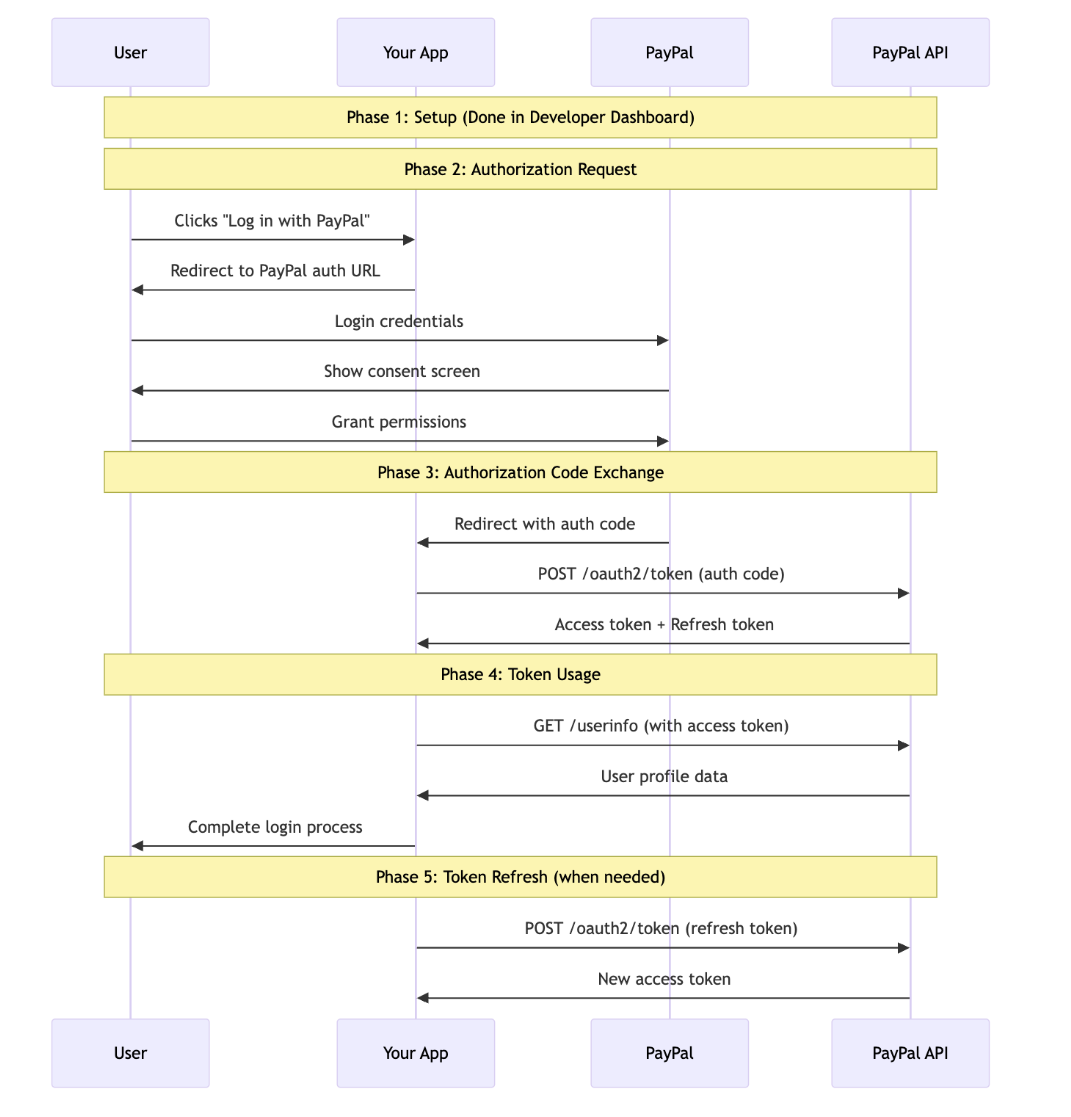 Figure 5: Sequence diagram of “Login with PayPal” flow
After the setup (see setup instructions here), the following steps occur to get the tokens (see Figure 5):
- App redirects to a PayPal’s auth URL after user clicks “Login with PayPal”.
- User logs in with their account and consents after reviewing requested permissions.
- PayPal redirects user back to your specified redirect URI after including the authorization code as query param.
- Application makes POST request to PayPal token endpoint with the authorization code to get the token.
- Application calls PayPal token endpoint for refreshing token if required.
- This token is then used by the application to make PayPal API requests on behalf of the user.
6. Building Our PayPal MCP Server
We will now look at the architecture details for PayPal’s MCP server with the desired functionality. We will build a comprehensive OAuth 2.1 authorization system built on top of PayPal’s existing OAuth infrastructure according to the MCP’s specification.
We will construct an MCP server that acts as both an OAuth authorization server and resource server, using PayPal as the external identity provider. We will use RSA asymmetric cryptography for JWT token signing and verification, eliminating shared secret vulnerabilities while enabling distributed token validation. We will include PKCE for authorization code protection, resource parameter binding to prevent token reuse across services, and robust middleware for request validation.
We will use Redis for scalable token storage with atomic operations, implement comprehensive OAuth discovery endpoints, and create a complete authorization flow that wraps PayPal’s authentication with MCP-specific token generation, ensuring secure access to MCP tools through standardized Bearer token authentication.
Below are some of the core entities in our architecture:
- MCP Client: OAuth 2.1 client that makes protected resource requests on behalf of a resource owner.
- MCP Server/Resource Server: OAuth 2.1 resource server that hosts protected MCP tools and validates access tokens.
- Authorization Server: Issues access tokens and manages user authentication (embedded within MCP server).
- PayPal OAuth Provider: External identity provider for user authentication.
- User-Agent (Browser): User’s browser for interactive authentication flow.
- Token Storage: Redis-backed storage system for tokens, codes, and client registrations.
Note that this document serves as a guide for building such a server with low level details, but does not provide the code implementation. The code implementation is left as an exercise for the reader. If you still want the code and do not care about how it works, I will publish the PayPal OAuth library I have built in a few days and update it’s link here.
Let’s now dig deeper into the OAuth flow and understand the implementation details in each phase and step. I highly recommend you to read the MCP specification for authorization before proceeding, but I’ll also try to explain it in my words.
6.1. Phase 1: Discovery and Client Registration
In this phase, the protocol leverages automatic discovery and dynamic registration to create a seamless authentication flow that requires no manual configuration.
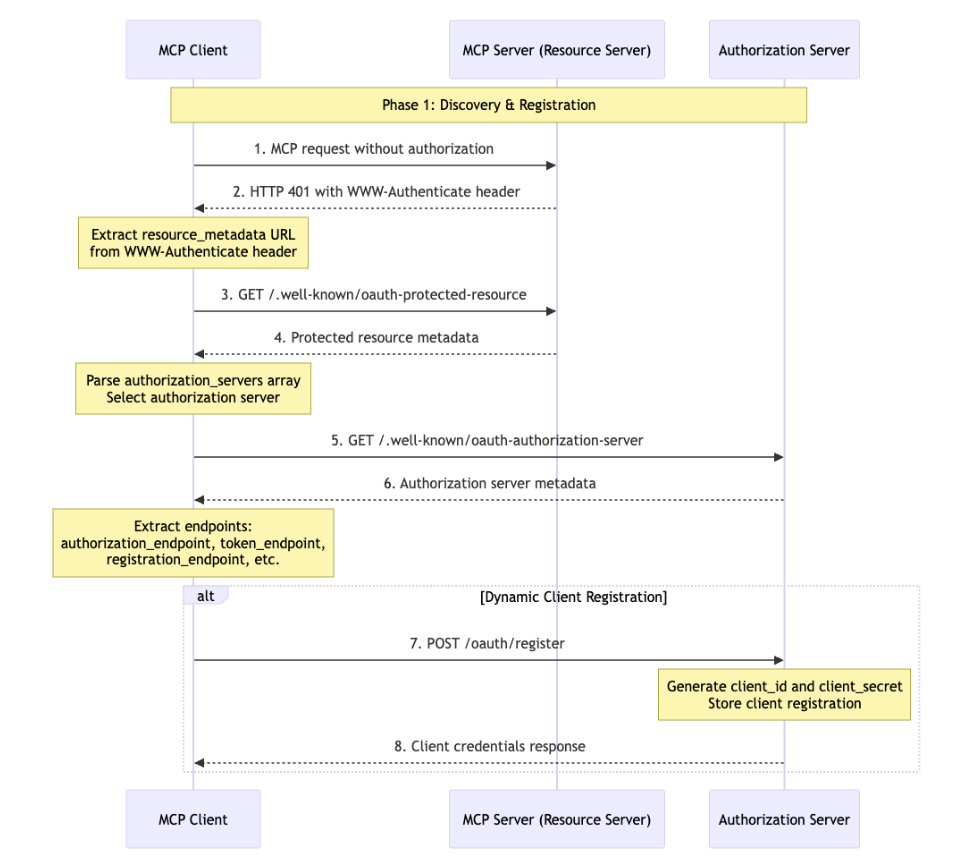 Figure 6: Phase 1: Discovery and Client Registration
See Figure 6 to better understand the steps described below.
6.1.1. Step 1-2: Authentication Challenge
When a client attempts to access an MCP server without proper authorization, the server initiates the OAuth flow by returning a 401 Unauthorized status with a WWW-Authenticate header. See example below:
1
2
3
HTTP/1.1 401 Unauthorized
WWW-Authenticate: Bearer realm="MCP",
                 resource_metadata="https://paypal-mcp.com/.well-known/oauth-protected-resource"
This header contains crucial information, particularly the resource_metadata parameter that points to the server’s OAuth discovery endpoint. The inclusion of the metadata URL enables fully automated discovery, eliminating the need for hardcoded configuration that could become outdated or incorrect.
6.1.2. Step 3-4: Resource Discovery
Upon receiving the authentication challenge, the client fetches the protected resource metadata from the provided URL. This metadata contains essential information about which authorization servers are trusted to issue tokens for this particular MCP server. The server responds with a structured list of approved authorization servers:
1
2
3
4
5
6
{
 "resource": "https://paypal-mcp.com/mcp",
 "authorization_servers": [
   "https://paypal-mcp.com",
 ]
}
This step allows servers to work with multiple authorization providers, change their authorization infrastructure without breaking existing clients, and ensure that clients only attempt to use tokens from approved sources.
6.1.3. Step 5-6: Authorization Server Discovery
With the list of valid authorization servers in hand, the client proceeds to discover the capabilities and endpoints of these servers. This typically involves fetching metadata from the well-known endpoint /.well-known/oauth-authorization-server. The authorization server responds with comprehensive information about its capabilities, supported grant types, and available endpoints:
1
2
3
4
5
6
7
8
9
10
11
12
13
14
15
16
17
18
{
 "issuer": "https://paypal-mcp.com",
 "authorization_endpoint": "https://paypal-mcp.com/oauth/authorize",
 "token_endpoint": "https://paypal-mcp.com/oauth/token",
 "registration_endpoint": "https://paypal-mcp.com/oauth/register",
 "jwks_uri": "https://paypal-mcp.com/.well-known/jwks.json",
 "introspection_endpoint": "https://paypal-mcp.com/oauth/introspect",
 "revocation_endpoint": "https://paypal-mcp.com/oauth/revoke",
 "response_types_supported": ["code"],
 "grant_types_supported": ["authorization_code"],
 "code_challenge_methods_supported": ["S256", "plain"],
 "scopes_supported": ["openid", "profile", "email"],
 "token_endpoint_auth_methods_supported": ["client_secret_basic", "client_secret_post", "none"],
 "introspection_endpoint_auth_methods_supported": ["client_secret_basic", "client_secret_post"],
 "revocation_endpoint_auth_methods_supported": ["client_secret_basic", "client_secret_post"],
 "resource_parameter_supported": true,
 "subject_types_supported": ["public"]
}
This metadata discovery, standardized by RFC 8414, enables true interoperability between different OAuth implementations. Clients can dynamically adapt to server capabilities, detecting which authentication flows are supported and which security features are available. This eliminates the brittleness of hardcoded endpoints and allows authorization servers to evolve their capabilities over time.
6.1.4. Step 7-8: Dynamic Client Registration
The final preparatory step involves the client registering itself with the authorization server to obtain OAuth credentials. This dynamic registration process, defined by RFC 7591, transforms what traditionally required manual intervention into an automated flow. The client sends its registration details, including its name, redirect URIs, and requested capabilities:
1
2
3
4
5
6
7
8
{
 "client_name": "MCP Client Application",
 "redirect_uris": ["http://localhost:8080/callback"],
 "grant_types": ["authorization_code"],
 "response_types": ["code"],
 "scope": "openid profile email",
 "token_endpoint_auth_method": "none"
}
The authorization server evaluates this registration request according to its policies and, if approved, issues credentials:
1
2
3
4
5
{
 "client_id": "mcp_client_Zq8-sf8yi-EESftTRQXrIA",
 "redirect_uris": ["http://localhost:8080/callback"],
 "token_endpoint_auth_method": "none"
}
6.2. Phase 2: Authorization Code Flow with PKCE
Once a client has completed discovery and registration, it can initiate the actual authorization process. This phase implements the OAuth 2.1 authorization code flow enhanced with PKCE (Proof Key for Code Exchange) and resource indicators, creating a secure mechanism for obtaining user consent and access tokens.
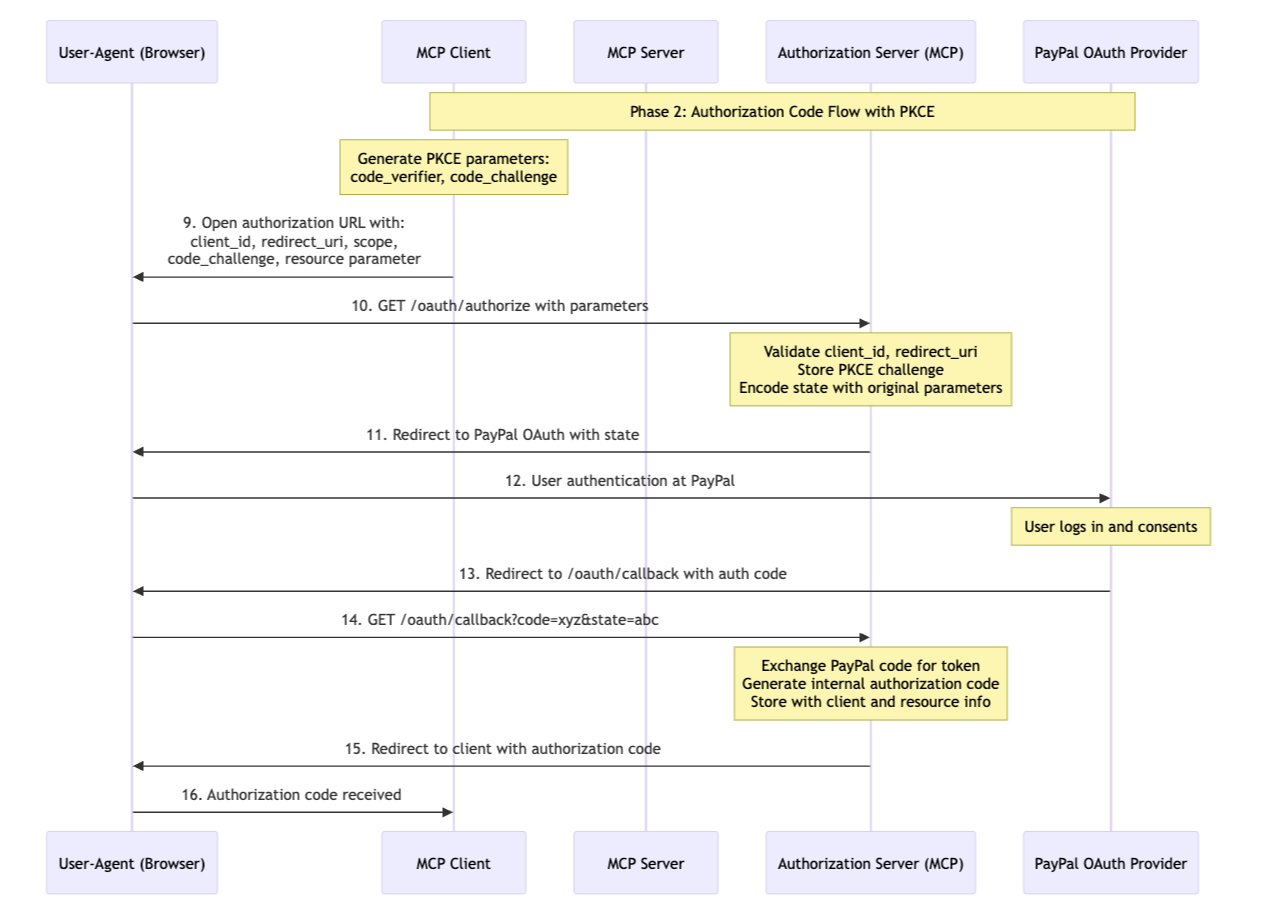 Figure 7: Phase 2: Authorization Code Flow with PKCE
See Figure 7 to better understand the steps described below.
6.2.1. Step 9: Initiating Authorization with PKCE
The authorization process begins when the client constructs a carefully crafted authorization URL. This URL includes critical security parameters that protect the entire flow (check example below). The client generates a cryptographically random code verifier and calculates its SHA256 hash as the code challenge. This PKCE mechanism, now mandatory in OAuth 2.1, provides crucial protection against authorization code interception attacks.
1
2
3
4
5
6
7
8
9
https://paypal-mcp.com/oauth/authorize?
 client_id=mcp_client_Zq8-sf8yi-EESftTRQXrIA&
 response_type=code&
 redirect_uri=http://localhost:8080/callback&
 state=random-state-value&
 code_challenge=E9Melhoa2OwvFrEMTJguCHaoeK1t8URWbuGJSstw-cM&
 code_challenge_method=S256&
 resource=https://paypal-mcp.com/mcp&
 scope=openid+profile+email
The inclusion of the resource parameter, defined by RFC 8707, serves a vital security function. It explicitly binds the resulting token to the specific MCP server, preventing token confusion attacks where a token issued for one resource might be accepted by another. This is particularly important in the MCP ecosystem where multiple servers might use the same authorization server.
6.2.2. Step 10: Server-Side Validation and Preparation
When the authorization server receives this request, it performs multiple validation steps that ensure the security of the flow. First, it validates that the client_id corresponds to a registered client and that the redirect_uri exactly matches one of the registered values. This validation prevents open redirection attacks where an attacker might try to intercept the authorization code by manipulating the redirect destination.
The server stores the PKCE code challenge in its session storage, associating it with this specific authorization attempt. This storage is crucial because the server will need to verify the code verifier during the token exchange phase.
Additionally, the server encodes all the relevant parameters including the resource indicator and original client state into its own state management system. This encoding ensures that when the user returns from PayPal authentication, the server can properly complete the authorization flow with all the original context intact.
6.2.3. Step 11-12: PayPal Authentication Integration
The authorization server redirects user to PayPal’s identity infrastructure for authentication. The server constructs a PayPal OAuth request that includes the necessary parameters for user authentication:
1
2
3
4
5
6
7
https://www.paypal.com/connect?
 flowEntry=static&
 client_id=mcp-auth-server-paypal-client&
 response_type=code&
 redirect_uri=https://paypal-mcp.com/oauth/callback&
 state=encoded-mcp-state&
 scope=openid+profile+email
This redirect flow ensures that user credentials never pass through the MCP authorization server. PayPal handles all the complexity of user authentication including multi-factor authentication, fraud detection, and account recovery while the MCP server focuses solely on authorization decisions.
6.2.4. Step 13-14: Processing the PayPal Response
When PayPal completes the authentication process and the user grants consent, it redirects back to the MCP authorization server with an authorization code. This begins a critical phase where the MCP server must validate the PayPal response and generate its own authorization code. The server first exchanges the PayPal authorization code for tokens, validating that the user successfully authenticated and authorized the request:
1
2
3
4
5
6
POST /v1/oauth2/token HTTP/1.1
Host: api-m.paypal.com
Content-Type: application/x-www-form-urlencoded
Authorization: “Basic <base64 mcp-auth-server creds>”
grant_type=authorization_code&
code=paypal-auth-code
Upon successful validation, the MCP server generates its own authorization code. This isn’t simply forwarding PayPal’s code it’s creating a new, MCP-specific code that’s bound to the original client, includes the resource indicator, and incorporates the PKCE challenge. This separation ensures that MCP authorization codes have their own lifecycle and security properties, independent of the underlying identity provider.
6.2.5. Step 15-16: Completing the Authorization Flow
With the MCP authorization code generated, the server redirects the user back to the client application. This redirect includes the authorization code and the original state parameter:
1
2
3
http://localhost:8080/callback?
 code=mcp-authorization-code&
 state=original-client-state
The client must validate that the returned state matches what it originally sent, preventing CSRF attacks where an attacker might try to inject their own authorization code. Once validated, the client can proceed to exchange this authorization code for tokens, completing the PKCE flow by providing the original code verifier.
6.3. Phase 3: Token Exchange and Access
Following successful authorization, the client must exchange its authorization code for an access token that can be used to access protected MCP resources. This phase implements crucial security mechanisms that ensure only legitimate clients can obtain and use access tokens.
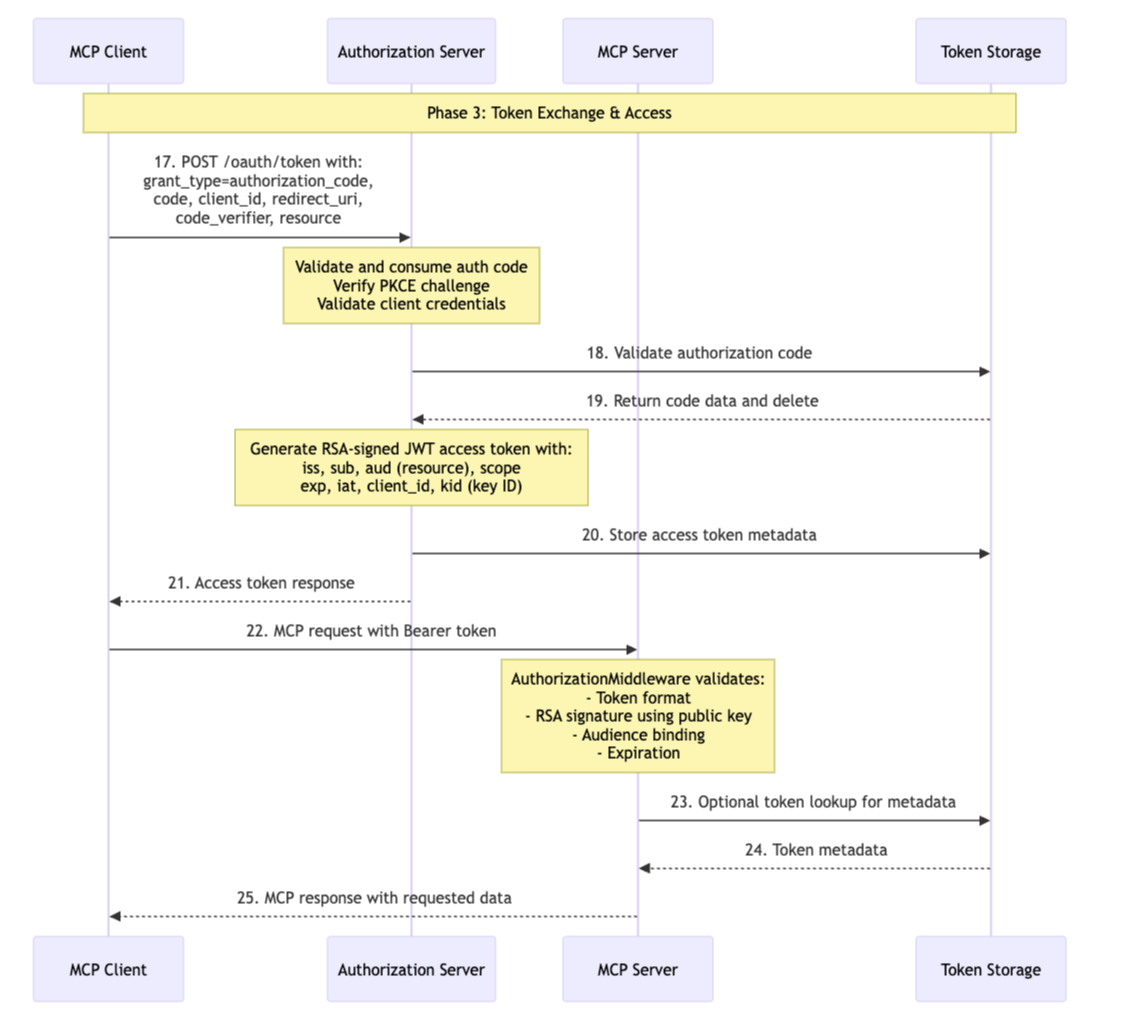 Figure 8: Phase 3: Token Exchange and Access
See Figure 8 to better understand the steps described below.
6.3.1. Step 17: Token Exchange with PKCE Verification
The client sends its token request including the original code verifier that corresponds to the code challenge sent during authorization:
1
2
3
4
5
6
7
8
9
POST /oauth/token HTTP/1.1
Host: paypal-mcp.com
Content-Type: application/x-www-form-urlencoded
grant_type=authorization_code&
code=mcp-authorization-code&
client_id=mcp_client_Zq8-sf8yi-EESftTRQXrIA&
redirect_uri=http://localhost:8080/callback&
code_verifier=dBjftJeZ4CVP-mB92K27uhbUJU1p1r_wW1gFWFOEjXk&
resource=https://paypal-mcp.com/mcp
This request completes the PKCE flow by proving that the same client that initiated the authorization is now completing it. The authorization server will hash the provided code_verifier and compare it against the stored code_challenge. This mechanism is particularly powerful because even if an attacker intercepts the authorization code, they cannot complete the exchange without the original random code_verifier that never left the client’s control.
The inclusion of the resource parameter ensures that the resulting token will be properly bound to the intended MCP server. This prevents confused deputy attacks where a token issued for one resource might be accepted by another, a critical security consideration in distributed systems where multiple resources share authorization infrastructure.
6.3.2. Step 18-19: Atomic Code Validation and Consumption
When the authorization server receives the token request, it performs validation and consumption as an atomic operation, ensuring that even in high-concurrency environments, each authorization code can only be used exactly once.
This atomicity is typically implemented using Redis atomic operations or database transactions. The server simultaneously validates the code’s authenticity, checks its expiration, verifies the PKCE challenge, and marks it as consumed. If any part of this validation fails, the entire operation rolls back, and the code remains unconsumed. This prevents race conditions where multiple simultaneous requests might attempt to use the same authorization code. The atomic consumption ensures this security property holds even under adverse conditions like network retries or distributed system failures.
6.3.3. Step 20: JWT Generation with RSA Signing
Upon successful validation, the authorization server generates a JWT access token using RSA asymmetric cryptography. This architectural choice provides significant security advantages over symmetric signing methods. The server uses its RSA-2048 private key to sign tokens, while resource servers only need the public key for validation:
1
2
3
4
5
6
7
8
9
10
11
12
13
14
15
{
 "header": {
   "alg": "RS256",
   "kid": "rsa-public-key-hash"
 },
 "payload": {
   "iss": "https://paypal-mcp.com",
   "sub": "mcp_client_Zq8-sf8yi-EESftTRQXrIA",
   "aud": "https://paypal-mcp.com/mcp",
   "exp": 1700000000,
   "iat": 1699996400,
   "scope": "openid profile email",
   "client_id": "mcp_client_Zq8-sf8yi-EESftTRQXrIA"
 }
}
The RSA signing provides non-repudiation cryptographic proof that this specific authorization server issued the token. The Key ID (kid) in the header enables sophisticated key rotation strategies, allowing the authorization server to use multiple keys simultaneously and rotate them without disrupting existing tokens. Resource servers can fetch the corresponding public key from the JWKS (JSON Web Key Set) endpoint using this identifier.
The audience (aud) claim implements RFC 8707 resource indicators at the token level, cryptographically binding each token to its intended MCP server. This prevents a critical security vulnerability where tokens issued for one service could be reused at another. Combined with the issuer (iss) claim, this creates a strong binding between the token, its issuer, and its intended consumer.
6.3.4. Step 21: Structured Token Response
The authorization server returns a structured response that provides the client with everything needed to use the token effectively:
1
2
3
4
5
6
{
 "access_token": "eyJhbGciOiJSUzI1NiI...",
 "token_type": "Bearer",
 "expires_in": 3600,
 "scope": "openid profile email",
}
The expires_in field allows clients to implement intelligent token refresh strategies, requesting new tokens before the current one expires rather than waiting for requests to fail. The scope field confirms the actual granted permissions, which may be less than what the client requested based on user consent or server policies.
6.3.5. Step 22: Making Protected Requests
With a valid access token, the client can now access protected MCP resources. Every request must include the token in the Authorization header using the Bearer scheme:
1
2
3
GET /mcp HTTP/1.1
Host: paypal-mcp.com
Authorization: Bearer eyJhbGciOiJSUzI1NiI...
The stateless nature of HTTP requires that authorization be proven on every request. This might seem redundant, but it ensures that access can be revoked immediately by invalidating tokens, and it allows for horizontal scaling of resource servers without shared session state.
6.3.6. Step 23-24-25: Token Validation & Resource Access
When the MCP server receives a request with a Bearer token, it performs multi-layered validation that ensures both the token’s authenticity and its appropriateness for this specific request. The server first validates the RSA signature using the public key fetched from the authorization server’s JWKS endpoint. This cryptographic validation proves the token hasn’t been tampered with and was issued by the trusted authorization server.
The audience validation ensures this token was specifically issued for this MCP server, preventing token confusion attacks. Expiration checking limits the window of vulnerability if tokens are compromised. The metadata lookup provides PayPal’s access token to the MCP server corresponding to the JWT issued, which it uses to access PayPal’s services on the behalf of user.
7. Conclusion
That’s it, we talked about why MCP servers need auth and what are the different mechanisms for MCP auth. And we built the architecture of an OAuth2.1 compliant MCP server which includes the complete authorization flow that wraps PayPal’s authentication with MCP-specific token generation, ensuring secure access to MCP tools through standardized Bearer token authentication.
Thanks for making it to the end. And for the code implementation, I will soon publish the PayPal OAuth library I have built that wraps around FastMCP object and automatically integrates PayPal’s authentication into the MCP server in compliance to the OAuth2.1 specification. Stay tuned :)